

The past few months have focused on speed, intelligence, and control — giving marketing, agency, and operations teams even more ways to work smarter with Screendragon.
From AI-powered workflows to enhanced collaboration and customization tools, this release helps you automate daily tasks, gain deeper visibility, and seamlessly transition projects from brief to delivery.
Whether managing global campaigns, creative approvals, or complex resourcing, these updates make Screendragon work harder for you — so your teams can focus on what matters most: creating great work, faster.
Let’s dive into what’s new!
New Grouping & Kanban Boards: Visualize Work Your Way
We are excited to introduce several enhancements to the Grouping and Kanban features within the List View. These new groupings, along with the introduction of a Kanban view, help you visualize work the way you want to see it.
- New Grouping and Kanban Options: Users can now enable grouping by various criteria and utilize Kanban views for better project management.
- List Manager Configuration: Grouping settings can be configured per column. (Note that certain field types, such as inode, are not permitted for grouping or Kanban views.)
- Consistent Result Sorting: Results in each list or group will follow the same sort order as the columns, ensuring a uniform view.
- Enhanced List/Group Sorting: A new dropdown has been added to enable sorting options for lists and groups.
Grouping View Enhancements:
- Load More Per Group: Users can now load additional records for each group as needed.
- Count Per Group: A count of items within each group is now displayed for better visibility.
- Default Load of 5 Records: The view initially loads five records per group for a streamlined experience.
Workflow Status View

Smarter Calendar View for Easier Scheduling
In response to feedback from clients regarding the current calendar view, we are excited to announce enhancements that allow for improved visualization of daily jobs:
- New One-Day View: Users can now view their calendar in a single-day format, enabling better management and oversight of daily tasks.
- Optional Three-Day View: In addition to the one-day view, a three-day view will also be available, providing flexibility for those managing a higher volume of jobs.
- Improved Screen Real Estate: These new views will provide more screen space for job tags, enhancing the user experience.
These enhancements are designed to meet the needs of our users, particularly those who handle 300-400 jobs per day, enabling them to visualize their workload more effectively.
The form view configuration tool offers both the one-day and three-day view options. These new views also provide more screen space for job tags, enhancing the user experience.

Faster, More Flexible List Sorting
We are pleased to announce significant enhancements to sorting in list views. These enhancements enable users to have greater control over how data is organized and displayed.
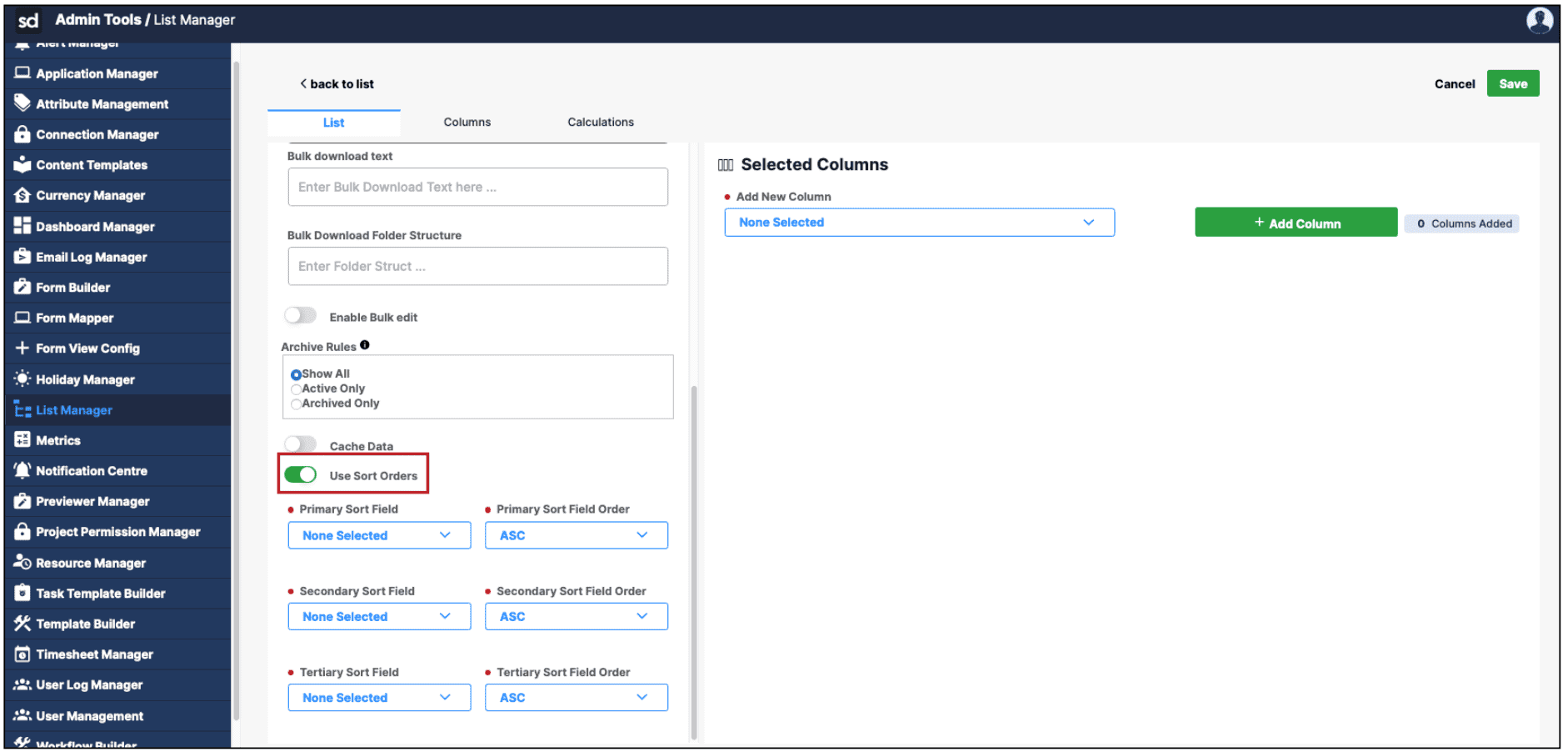
- Multiple-Level Sorting: Through the List Manager, users can now set sort orders at multiple levels— primary, secondary, and tertiary. This allows for improved organization of items within lists.
- Default Sorting Behavior: By default, lists auto-sort by the Created date, displaying the newest items at the top when first opened. The system remembers their preferred settings if users change the sort order.
- Configurable Sort Fields: Users can specify sort fields from a selection of meta columns or system values, including Created Date, ID, Step Entry Date, and Due Date. For each sort option, users can choose ascending or descending order.
- Dashboard Widget Integration: Dashboard widgets that use lists now automatically apply the primary sort settings from the List Manager, simplifying sorting management within dashboards.
- Front-End Sorting Behavior: Only the primary sort field is overridden when users sort a column, while existing secondary and tertiary sort methods remain intact. This ensures consistency in how items are displayed. For example, if a user sorts by client name but has multiple items with the same name, those will automatically be sorted by created date in ascending order.
Color Your Capacity – Visualize Your Workload with Custom Colors
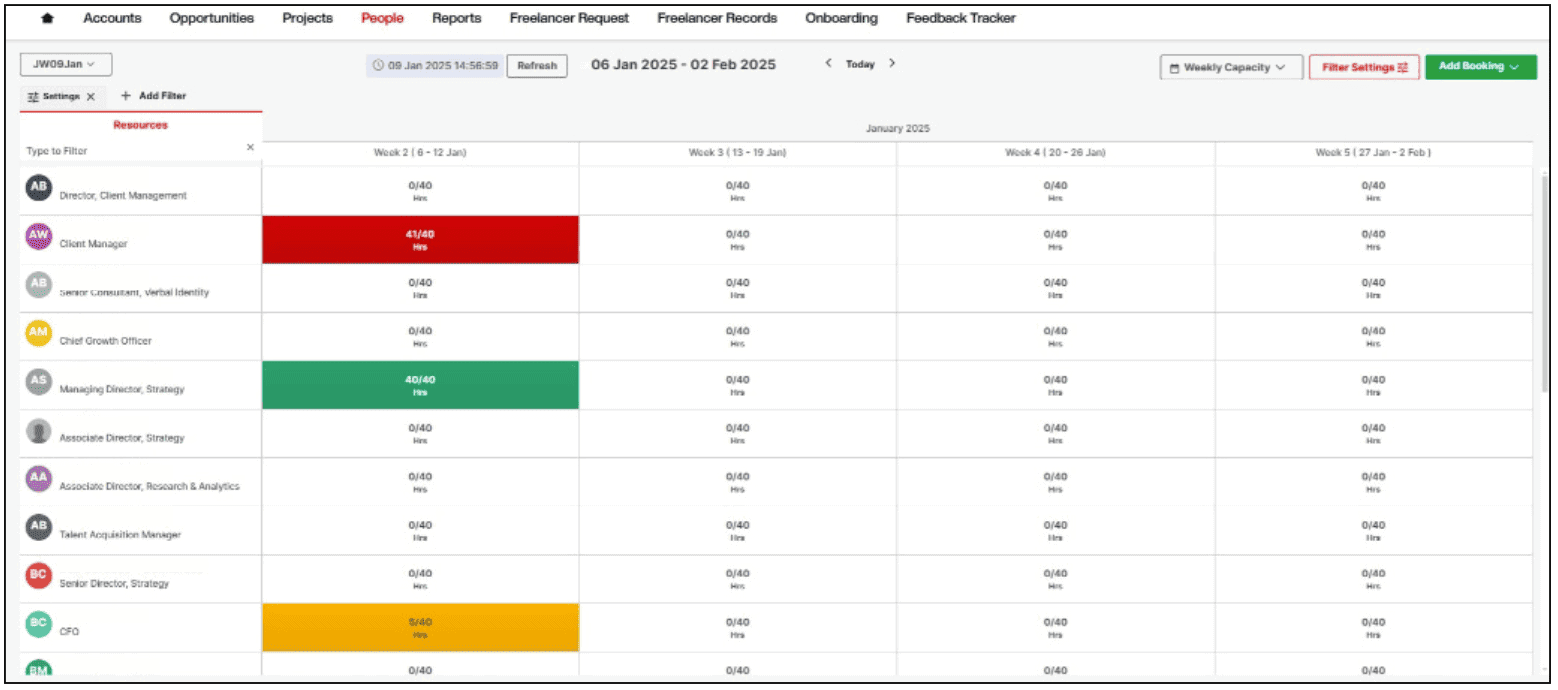
We are pleased to announce a new enhancement for custom percentage color assignments within the capacity views.
- Custom Color Coding for Hours: Admins can now set specific color codes for capacity hours as follows:
- Less than 35 hours = Yellow
- 35 to 45 hours = Green
- Greater than 45 hours = Red
- Site-Wide Formatting Rules: To ensure flexibility and transferability, admins can apply formatting rules across the site using the Resource Manager (RM) tool. This feature is an addition to the RM Filter Settings.
- Conditional Formatting Based on User FTE: Admins can establish conditional formatting based on user Full-Time Equivalent (FTE):
- If User FTE < 85% = Green
- If User FTE > 110% = Red
- Integration with Capacity Filters: This new RAG (% Red, Amber, Green) setup will apply specifically to capacity filters. The default settings (0-100% = Green, anything above 100% = Red) remain unchanged unless new settings are selected.
- Consistency Across Views: The custom color settings are reflected in the capacity view and resource view to maintain consistency throughout the user experience.
- Opt-In Feature: This enhancement will not affect existing sites, as it requires an opt-in to enable the new color and FTE range settings through the Resource Manager. If not selected, site settings will default to existing configurations.
This enhancement aims to improve visibility and user understanding of capacity management, enabling more effective resource allocation and planning.
Bulk Actions, Made Better
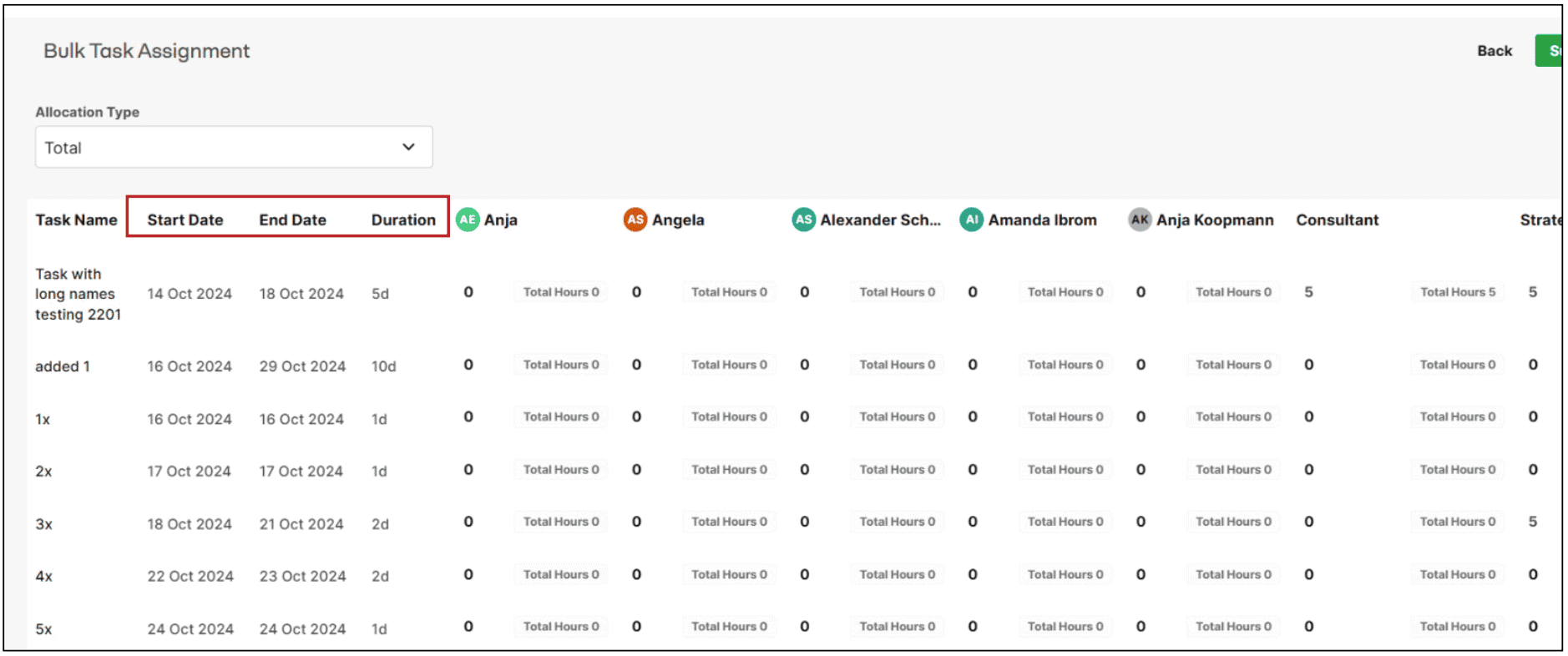
We have enhanced the bulk allocation by including Duration and Start/End Date columns.
Duration Column: This column displays the number of days for each task, providing clarity on the length of each booking.
Start/End Date Columns: These columns display the start and end dates for tasks, making it easier to identify bookings, particularly when tasks have similar names.
These additions enhance the user experience and facilitate the accurate determination of allocation hours to be assigned.
Performance Improvements
Grid Refresh Performance: Previously, uploading a file would trigger a full grid refresh, causing a noticeable delay. With this release, users can now upload files seamlessly, eliminating the grid refresh delay and providing a smoother, more efficient file upload experience.
Audit Trail Performance: We have improved performance to ensure a faster, more responsive experience.
Matrix Storage: We previously migrated Matrix storage from SQL to MongoDB. Although this move was completed, it was never fully deployed in a live environment. This release is to reactivate and implement that migration. The changes are particularly beneficial for sites with large and multiple matrices.
Download this article by clicking here <<